top of page

Improve PopScreen Performance with GPU Selection
Many PCs come with more than one graphics card that vary in processing power. In the event that Windows users experience low frame rates using PopScreen, here is a guide on how to select a faster graphics card to boost performance.
Selecting a different GPU for performance
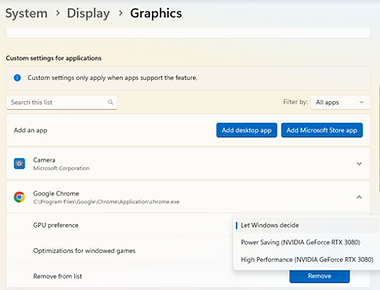
In your Windows Settings, navigate to System > Display > Graphics.
Select the High Performance option under GPU Preference for the browser you are running.
Thats it! Now you can restart the browser and PopScreen will now be using your High Performance graphics card.
bottom of page